

Visual regression with AI: the combination of automated testing, AI, and Figma that accelerated validations
Scaling quality in digital products is a challenge, especially with multiple platforms, integrated flows, and distributed teams working simultaneously. In Local Commerce, the area responsible for developing the app that connects consumers to restaurants, markets, and pharmacies at iFood, we faced this issue head-on: how to ensure that each new feature or integration wouldn’t break the experience our design team had proposed?
The traditional answer: visual regression testing based solely on screens worked, but had clear limitations. Tons of false positives, high maintenance costs for automated tests, constant screen changes with code adjustments, and worse: chances of human error during the validation process between the app interface and Figma. For example, it’s like trying to validate whether a house turned out identical to the architectural design by constantly comparing old photos with new ones; technically possible, but imprecise and labor-intensive.
That’s when the Local Commerce Quality Engineering team decided to take a risk: what if we used artificial intelligence to read the prototyped design in Figma and the app interface? And through this, compare both semantically rather than visually? Here comes the spoiler: the approach worked! And it’s changing how we think about visual testing at scale. Check out all the details of the process, methodology, and much more in this article!
The problem: traditional visual regression doesn’t scale!
Before discussing the solution, it’s worth understanding why the old model reached its limit.
Pixel-by-pixel comparison or visual inspection seems precise, but it’s fragile. Any minimal change, whether a font that renders 1px differently between environments, an animation in progress, or even page loading delays trigger alerts. The result? Teams ignoring legitimate warnings because they learned that “it can always be a false positive.”
Screen flows in Figma showing the future and app versions reflecting old experiences that haven’t been updated yet become the standard, not the exception. Keeping screen references updated according to the current experience the app is displaying requires a process and a discipline of constant updates.
The solution: AI as a bridge between Figma and application
The core idea is simple: use AI to read both the screen design in Figma and the application; convert both into a comparable structured format; and finally, let artificial intelligence identify relevant differences, not noise.
How the flow works:
Baseline directly from Figma
We make a request via Figma API, collecting the design reference of how the screen should be.
AI converts design into structured JSON
A service makes a request to the GenPlat API, iFood’s machine learning platform designed to simplify the creation of generative AI products. In this request, we use the gpt-5-mini model to analyze the collected screen reference and extract semantic information, such as the present components (buttons, texts, icons), their properties (color, font, size, positioning), and visual hierarchy. All results are transformed into a structured and comparable JSON.
Screen reference capture in the application
During automated test execution, screenshots of the app screen are captured.
AI converts screenshots collected in the app by automated tests into structured JSON
Through GenPlat, the model reads the application screenshots and performs the same extraction: identifies components, properties, structure. From this moment, we have another structured JSON.
Semantic comparison between JSONs
Here’s where the magic happens: instead of comparing pixel by pixel, the model compares the two JSONs. It understands that a button changed color, that a text is wrong, that an icon disappeared — these are relevant differences from a visual regression testing perspective.
Automated report with visual differences
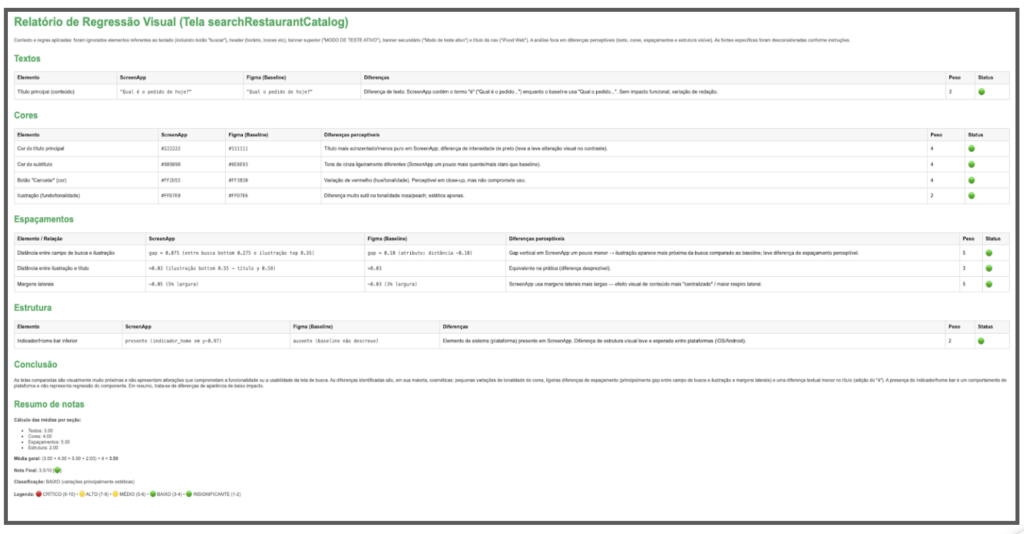
A report is generated pointing out exactly what diverged between Figma and application, with semantic context. Teams can act quickly: either fix the visual bug, or update the baseline if the change was intentional.
Technologies involved:
Figma API: baseline collection;
GenPlat with GPT-5 mini model: reading and conversion of visual references, semantic comparison;
Test automation: screenshot capture, flow orchestration;
JSON: structured format for semantic representation and comparison.
Before vs after: what changes in practice
The difference between approaches becomes clear when you compare them side by side:
Traditional approach:
Baseline: static screenshot captured and manually evaluated;
Comparison: pixel-by-pixel or manual difference;
Result: high maintenance effort and many false positives generated by irrelevant problems for interface validation, for example, rendering variations and screen animations.
New approach (automated testing + AI + Figma):
Baseline: automatically extracted from Figma via API;
Comparison: semantic analysis between structured JSONs;
Result: automated process generating relevant value with low noise.
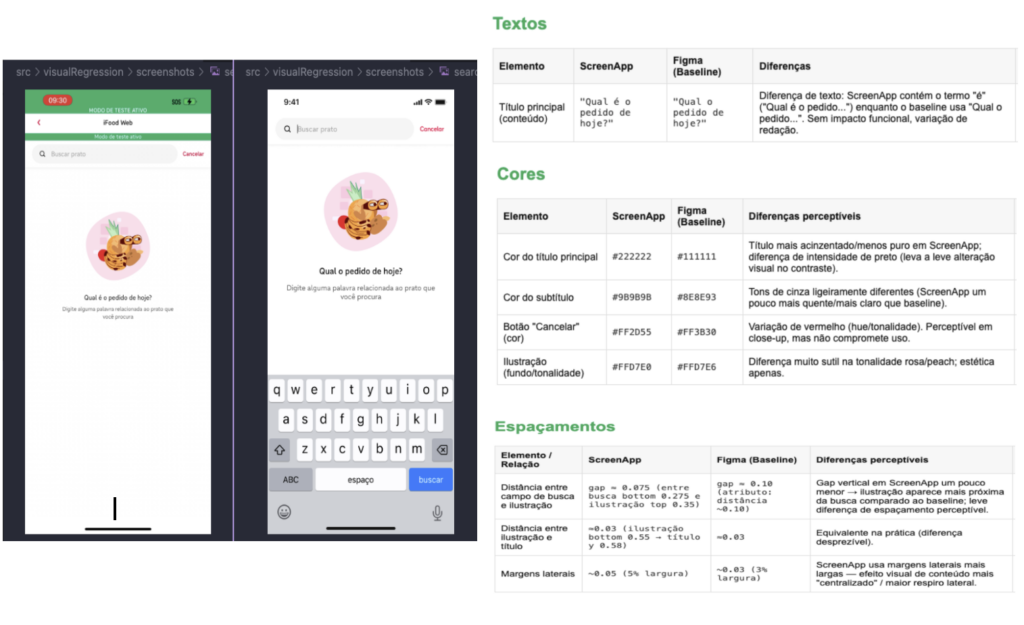
The change isn’t just technical, it’s cultural. Design, Product, Development, and Quality teams now work with the same source of truth. When a test fails, investigation starts with context: “which component diverged?” instead of “which pixel region changed?” or “do we have the right Figma version?”
What we learned along the way
Implementing AI in quality processes isn’t plug-and-play. Especially when you’re creating something new.
Process is as important as technology
Defining how to update the Figma baseline when the flow evolves was and is as critical as implementing AI agents and models. Without a clear process, automation becomes chaos in execution. We involved Design, Development, and Quality teams from the start to align responsibilities and workflows.
AI accuracy requires iteration
The first JSONs generated by the model weren’t perfect: components identified incorrectly, confusing hierarchies, missing attributes. We adjusted prompts, refined the expected structure, tested with edge cases. AI is powerful, but needs direction.
False positives still exist (but much less)
Even with semantic comparison, there are cases where AI interprets differences that aren’t relevant. We’re continuously refining, but it’s already a drastic reduction compared to manual validation.
Orchestration between Figma, AI, and automation has hidden complexity
Synchronizing Figma versioning with test execution, ensuring capture of the correct application state, dealing with flows that fail… each piece adds operational challenges. The technical solution is elegant, but the surrounding process infrastructure needs to be robust.
Cross-functional collaboration is key
This isn’t an isolated quality project, it’s an initiative that touches Design, Product, Development, and Quality. Coordinating expectations and responsibilities was as challenging as writing code.
Project evolution and next steps:
Consolidate baseline update process: Ensure that when Design evolves in Figma, the baseline is updated systematically and traceably.
Expand coverage of critical flows: We started with the Uber project, now we’re in Checkout on the app and want to scale to other critical flows.
Increase solution accuracy: Further reduce false positives and negatives through the use of prompt engineering practices.
Measure real impact: Time saved in manual validation, visual bugs detected before production, and team confidence in process automation. One of the approaches used will be the Confusion Matrix to evaluate model performance.
Document and share learnings: Create a playbook for other teams who want to experiment with similar approaches to solve problems.
We’re building this in beta version — restless, testing, adjusting. But the direction is clear: visual quality at scale will only happen if we use artificial intelligence as an ally, not as a replacement for well-designed process.
Evolving quality with AI
Visual regression has always been one of those areas where automation promises a lot but delivers little — until now! By connecting AI, Figma, and test automation, we not only solved technical limitations, but also created a connection between design and quality teams that didn’t exist before.
The future of Quality Engineering isn’t about replacing people with AI, it’s about amplifying teams’ capacity to focus on what matters: understanding business impact, designing test strategies, and ensuring exceptional experiences for our users. Leaving repetitive and manual activities behind frees up energy to think about these strategies.
If you work with engineering and feel that screen validations consume time without delivering confidence, try questioning the traditional model. And if you’re part of iFood: this is the kind of experimentation we celebrate. Bold teams solving real problems with cutting-edge technology, without waiting for permission to innovate.

Build the future at iFood
We are always looking for passionate developers, designers and data scientists to help us revolutionize the food delivery experience. Join iFood Tech and be part of building the future of food technology.
Discover our Careers
You might also like to read
Read more about Engineering
Auto Approval: how iFood accelerated code review by 33% with automated risk assessment
From MR queues to automated risk analysis: how context, heuristics, and LLMs revolutionized code review at iFood At iFood, accelerating the engineering process without compromising security and quality is a constant challenge, especially when we consider the scale of our…

IFDS: Inside the Engineering Patterns and Component Architecture of iFood Design System
How we connect design and code through rigorous engineering patterns to scale interfaces at iFood From Divergence to Convergence: The Real Problem At iFood, we faced a common problem in large-scale technology organizations: a growing divergence between design and code.…


Scaling Engineering with confidence: the role of AI, RAG and governance at iFood
Introduction: the real challenge behind technical onboarding In technology companies operating at scale, technical onboarding tends to be a sensitive point. The larger the organization, the greater the volume of standards, guides, architectural decisions, and security requirements that a developer…

Meet other Authors
Each article is the result of the vision and expertise of our authors. See who contributes to our blog: