

Canary 2.0: how iFood turned production deploy into a safe and automated process
Discover the full journey of how we automated the decision to keep or abort every production deploy, achieving a 37% reduction in total deployment-related incidents
In distributed systems operating at large scale, there is a clear limit to how well test environments can represent reality. At iFood, this limit becomes evident when we look at the volume and complexity of the operations involved.
There are hundreds of interdependent services, millions of requests being processed continuously, and a set of interactions that never repeat in the same way outside of production. This context means that sandbox environments, while necessary, cannot reproduce the behavior of the system in real use — after all, no test environment perfectly simulates production, with real traffic, unpredictable behavior patterns, and scalability.
This realization did not lead to an attempt to eliminate production as a validation environment, but rather to the opposite scenario. We came to accept that it is precisely in production that the system reveals itself most completely. From that point on, the question was no longer how to avoid testing in production, but how to structure that process in a safe, controlled, and predictable way.
The Canary 2.0 solution was born out of exactly this need and was built with Kubernetes and Argo Rollouts, organizing the rollout of new code versions in a progressive, monitored, and reversible way — allowing application behavior to be validated with real data before a full promotion.
When growth exposed the limits of Canary 1.0
The first version of the system, built internally, already allowed traffic control between versions, behavior observation in production, and progressive deploys. At an early stage, this represented an important step forward.
As the architecture grew, limitations emerged that were not only technical but also organizational. The tooling had been developed over time by different people, making continuous evolution and maintenance difficult. In some cases, parts of the code were no longer fully understood by the current team, generating a series of implications for its evolution.
From an operational standpoint, the deploy flow was heavily coupled to pipelines, requiring manual variable editing and job re-execution for each rollout step. In addition, canary and stable ran on separate releases with independent HPAs, where promotion replaced all pods at once, creating a real risk of overload.
The data reflects this scenario: 21% of deploys did not use the canary flow, and 48% followed an aggressive progression. The problem was not the absence of a tool, but the tool’s inability to induce the desired behavior.
Why we built a protection layer on top of Argo Rollouts
Building Canary 2.0 started with a clear shift in perspective. The question was no longer how to improve the existing canary, but how to ensure that deploys happen the right way, regardless of who was operating them.
The choice of Argo Rollouts as a foundation came after evaluating different market alternatives. However, the differentiator of Canary 2.0 lies in the layer built on top of that foundation, which incorporates rules, restrictions, and protection mechanisms directly into the deploy flow.
The central architecture involves a deploy API that orchestrates the rollout lifecycle, translating CLI commands into Argo Rollouts operations via kubectl. A single values.yaml file configures canary and stable, eliminating the duplication of the previous model.
The most important change is in the pod model: in Canary 2.0, canary and stable run on the same release. Stable pods are always scaled by the HPA to the desired number of replicas, regardless of the canary weight. This means an abort is safe and instantaneous. Pods are born as canary and promoted to stable fluidly, without mass replacement.
From GitLab to the terminal
In Canary 1.0, operating a deploy meant navigating GitLab pipelines, editing CI variables, re-running jobs, and interpreting fragmented logs. The process was far removed from the development environment and required context and experience that not every software engineer at iFood had.
Canary 2.0 brought control to where developers already are: the terminal. At iFood, we developed the Tompero CLI, a command-line tool that allows full visibility into a rollout’s state and operates the entire canary lifecycle with simple commands: get, promote, abort, retry, and restart. All operations are also available via API, enabling integration with existing automations and workflows.
With a single command, the developer can easily visualize:
- Which cluster and namespace the service is running on;
- The canary status;
- The progress bar with all weights;
- Whether a promotion window or freezing window is active;
- The state of each pod (canary or stable).
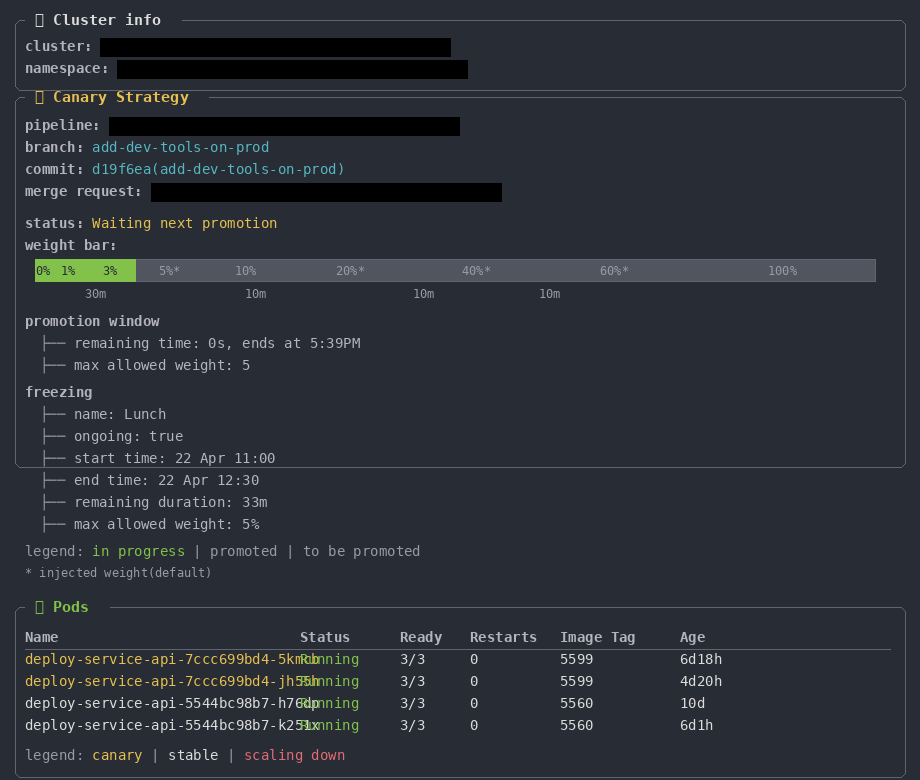
This change reduces friction and increases predictability. The experience stays in a single channel — the developer doesn’t need to leave the terminal, doesn’t need to navigate between interfaces, and has full visibility into what is happening. Including information that was previously scattered across GitLab, Datadog, and Kubernetes.
Structured progression: 0% → 5% → 20% → 40% → 60% → 100%
The rollout follows a defined sequence of stages. Each step exists to allow real observation of behavior before moving forward. For high-impact services, the model includes promotion windows: mandatory stabilization periods before exceeding 5% of traffic. Critical services can add more intermediate stages; non-critical services can customize default weights. The system adapts to criticality, but never allows skipping the progression.
Freezing Windows in detail
During periods of heightened sensitivity — such as peak order times, which are natural to iFood’s business, with critical windows around lunch and dinner hours — the system automatically halts rollout progression. If a canary is at 20% when a freezing window begins, it stays at 20% until the period ends. Once it’s over, the process resumes from the last stable state, with no manual intervention required.
This logic acknowledges something many deploy systems ignore: the risk of a failure at 8pm on a Friday is categorically different from the risk at 10am on a Tuesday for iFood.
Canary on Branch: validate before merging
In traditional flows, code needs to be integrated into the main branch before being validated in production. This creates a dilemma: if the merge happens before real validation, potentially problematic code is already in the trunk. If validation happens before the merge, developers are left waiting and blocked.
Canary on Branch inverts this logic. It’s possible to start a canary directly from a feature branch, with no prior merge needed. The system routes a controlled fraction of traffic to the branch version, applying the same progression, freezing, and promotion guardrails as any canary.
If production validation confirms the code is healthy, the canary can be promoted directly to stable — without going through a new deploy from the main branch. If something goes wrong, the abort is immediate and the code never reached the trunk.
In practice, this significantly shortens the feedback cycle. Developers get confirmation that their code works in production before integrating it. For critical or high-risk changes, this capability changes the trust equation — the merge stops being an act of faith and becomes confirmation of something already validated.
Auto Abort: automating the response to failures
Among all Canary 2.0 features, Auto Abort best represents the system’s evolution. It connects the deploy process to the observability infrastructure, using metrics and regression tests to monitor application behavior in real time. When a relevant deviation is detected, the system automatically halts the rollout and reverts to the stable version.
The architecture operates with two detection channels: Datadog (via standard and custom monitors) and a regression test orchestrator. When an alert is received, the system validates whether an active canary exists, checks if auto abort is enabled for that service, and executes the abort if necessary. A notification is automatically sent to the responsible team’s Slack channel.
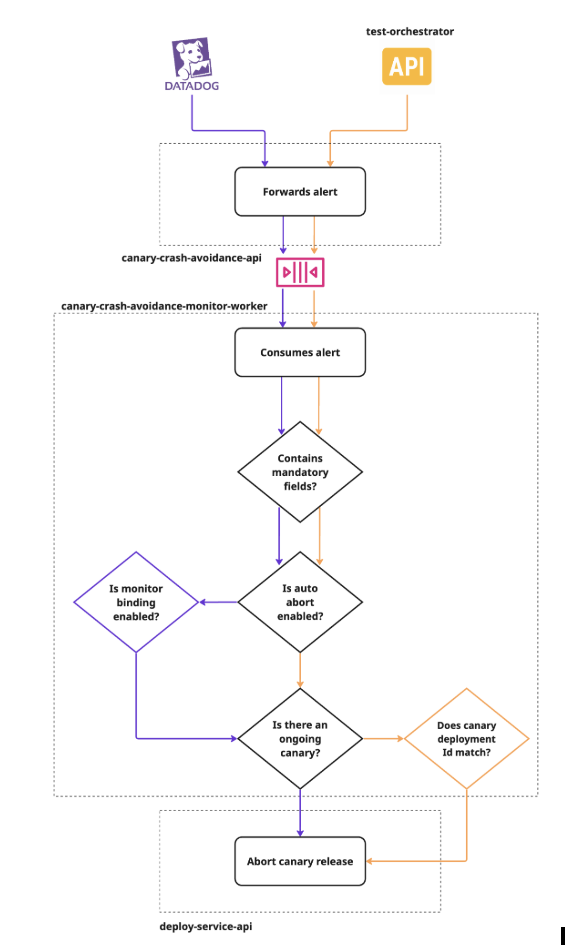
Teams can enable or disable auto abort per service, link custom Datadog monitors, and configure temporary exceptions — all via Tompero CLI. When an abort occurs, the reason is logged and visible when querying the deployment status.
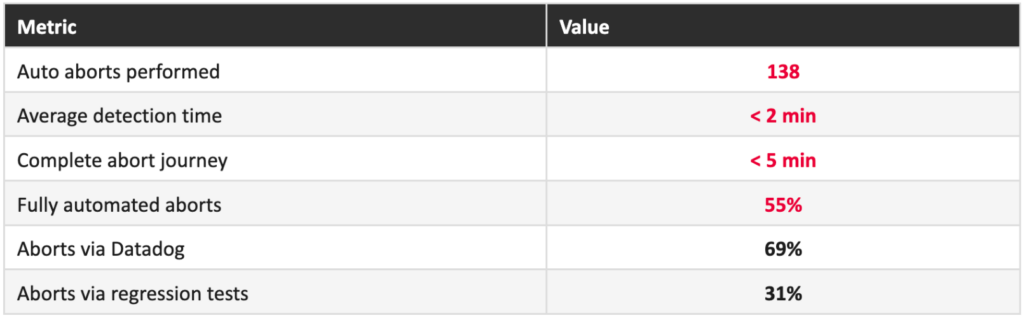
A retrospective analysis showed that 43% of deployment-related incidents from the previous cycle would have been avoided if Auto Abort had been active during that period.
The numbers after the shift
Behavior change

Incident impact
- 37% reduction in total deployment-related incidents between semester cycles;
- Mitigable incidents dropped by 47%.
Adoption at scale
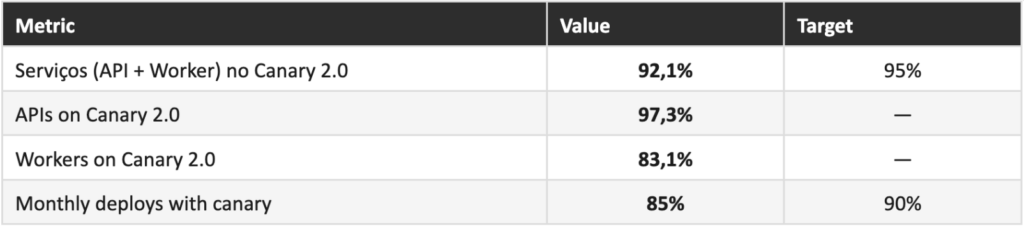
Migration at scale and zero incidents in the process
The consolidation of Canary 2.0 as a standard was not just a consequence of the system’s improvement, but also of a coordinated migration effort.
After validation with an initial group of services, the Developer Experience team led the centralized migration of 881 non-critical services across 3 waves over ~3 weeks. Migrations happened between 4am and 8am, with a dedicated war room for monitoring. Zero incidents. This model of centralizing what can be centralized, and delegating what requires ownership, reflects an operational maturity that goes beyond technology.
Next steps and continuous evolution
Despite the progress, Canary 2.0 does not yet solve every challenge.
Auto Promote is the next most transformative step. Today, even healthy canaries require manual intervention to advance between stages. The goal is for the system to promote automatically when stability signals are positive.
There are also ongoing efforts to expand the model to web applications (still challenging in terms of observability and session control), and to evolve toward multicluster environments, which increase resilience and reduce the impact of localized failures.
By structuring the process as a system with clear rules, protection mechanisms, and observability integration, Canary 2.0 transforms deploy from a one-time event into a continuous validation flow.
More than that, it establishes a model where production is no longer seen as a risk to be avoided, but treated as the primary source of learning about system behavior.
The next steps follow exactly that direction: more autonomy, more coverage, less human intervention. The ultimate goal is for the system to decide on its own whether each deploy lives or dies — and for that decision to be better than anything a human staring at a dashboard could make.

Construa o futuro no iFood
Estamos sempre em busca de desenvolvedores, designers e cientistas de dados apaixonados para nos ajudar a revolucionar a experiência de entrega de alimentos. Junte-se à iFood Tech e faça parte da construção do futuro da tecnologia alimentar.
Conheça nossas Carreiras
Você também pode gostar de ler
Ler mais sobre Back-end

Conheça outros Autores
Cada artigo é resultado da visão e expertise dos nossos autores. Veja quem contribui com nosso blog: